Files created by the virus:
The threat copies itself as
all drives will be affected. Spreads through removable drives and steals information from the compromised PC.
This are the files created by this trojan virus

The following can indicate that you have this threat on your PC:
Your files and folders in removable drives have been replaced with shortcut links or moved to a folder called .Trashes or Drive and create a folder name 598

and the javascript inside it

- Download and run ESET JS/Bondat fixer

- just click the link to continue the download and open JS/Bondat removal tool

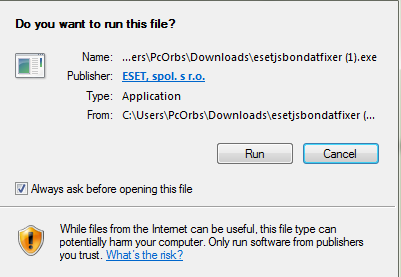
Click Run

3. and agree, now the JS/Bondat removal tool will scan and notify if your computer is infected

4. just click yes, after cleaning is complete, press Y to restart your computer.
Here is option 2
- Download Microsoft Security Essential and extract on the desired path. Click here for 32 bit and 64 bit.
2. Install MSEIntall32/MSEinstall64, Note! after the installation do not restart the computer just
download the updates, after updating the MSE will show updated then do a quick scan. if you
have trouble downloading the updates, for MSE 32Bit Click Here. for 64Bit Click Here
3.After a quick scan reboot the computer, if desired make a full scan to all drives if you have
drive d:, e: and so on, anyway, mse is always on guard.all done :)!

Click here for more info about JS/Bondat


Trojan Is one of the worst type of Malware which is very malicious and harmful. There are so many types of Trojan and whenever they come in presence spreads infection at large scale. I read about Panda banker Trojan on Virus removal Guidelines and it is also one of the malicious Trojan.
ReplyDeleteNice information to share with us. This is very useful. If there are any type of virus related problems, you can call our customer care number (877) 773-5390. Geek shield customer support representatives have the experience for all types of product and they can install or resolve the virus removal issue on your computer online.
ReplyDeleteThis comment has been removed by the author.
ReplyDeleteSimple & easy steps to get rid of Trojan from your system. Appreciate your efforts. For more details on virus removal, you may visit our website.
ReplyDeleteI have found that this site is very informative, interesting and very well written. keep up the nice high quality writing. Virus Removal Papamoa
ReplyDeleteNice article, thanks for posting this information.
ReplyDeleteIf you can't able to remove the existing virus or malware from the system then we recommend you to use the Reimage Repair software to remove it. This software has also its trial version for the user. The user can use it to remove or delete the trojan virus, ransomware virus, browser hijacker, adware virus, and many more easily. So, the user quickly uses this software to remove the virus or malware and also enhance the working speed of the PC.
best article
ReplyDeletethnkssss
buy telegram members
increase Telegram Channel Members
increase Telegram Channel subscribers
how to promotion telegram channel
Great Blog on What did Corona Virus Teach Me in Hindi
ReplyDeleteThank you for this wonderful post. It is very informative and useful. I would appreciate your effort for writing the easy and simple method to remove Trojan virus. Keep it up.
ReplyDeleteComputer Virus Removal Albury